Extract YouTube Video Slides into Clean PDFs
SlideSieve is a browser extension for Chrome and Edge that automatically captures presentation slides from any YouTube educational video — lectures, university courses, conference talks, and tutorials — and exports them as a clean multi-page PDF. It filters out instructor talking-head footage, extracts the full video transcript, and removes near-duplicate frames.
 Microsoft Edge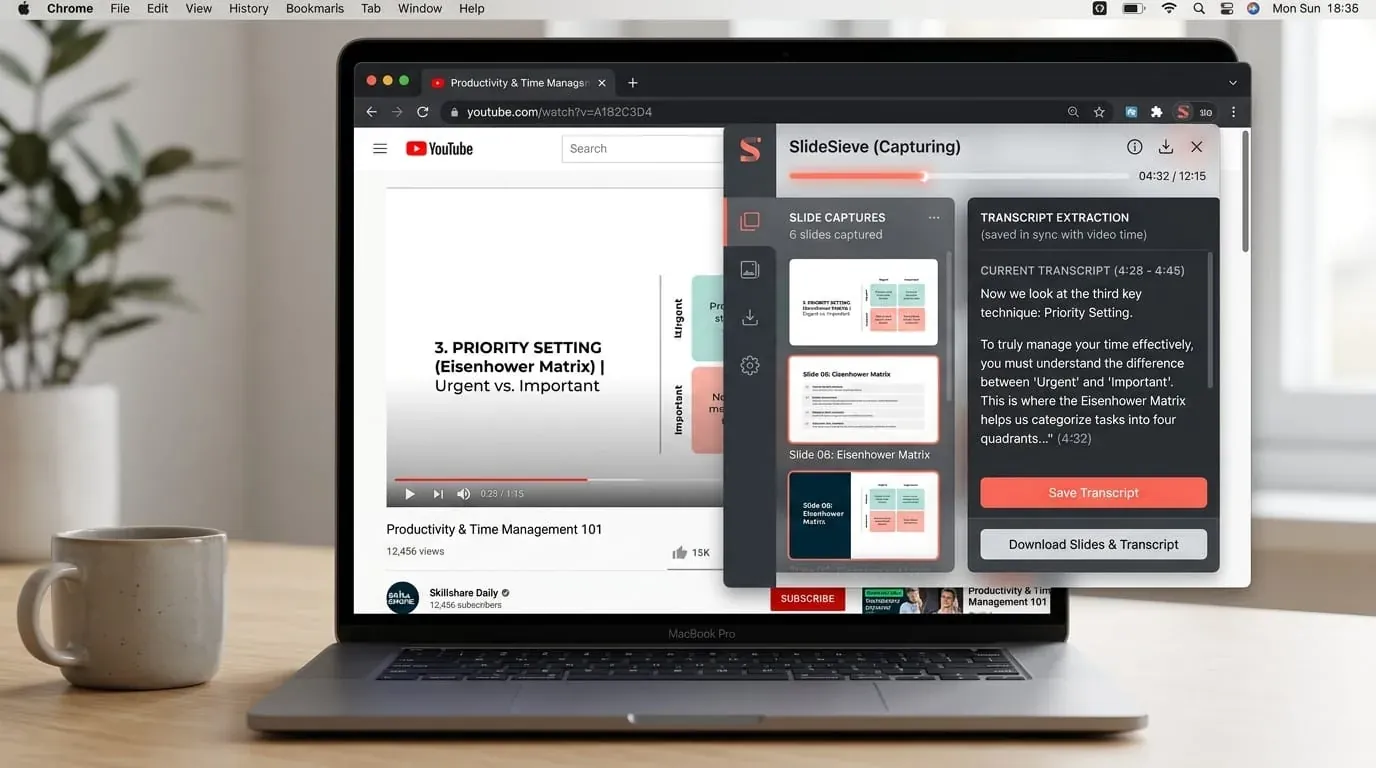
Free
Basic tier included
High precision
Slide detection
1-click
PDF export
100%
Private — no upload
Why use SlideSieve for YouTube?
Tailored detection algorithms designed specifically for YouTube lecture video layouts and study workflows.
Works on any YouTube video with slides
SlideSieve captures slides from MIT OpenCourseWare, Stanford, Harvard, 3Blue1Brown, Andrej Karpathy, Khan Academy, conference talks (NeurIPS, Google I/O), and any other YouTube educational channel.
Captures slides even in long multi-hour videos
SlideSieve handles lecture recordings of any length. For long videos, it continuously monitors the player and never misses a slide change — even in 3-hour university lecture recordings.
Handles YouTube's compression artifacts
YouTube streams are heavily compressed, introducing visual noise between frames. SlideSieve's binarized structural diff algorithm distinguishes real slide changes from video compression artifacts, preventing false captures.
Manual capture shortcut for live drawing and math
If an instructor writes equations or draws diagrams on a digital whiteboard that auto-detection skips, press Ctrl + Shift + 9 to add the current frame to your deck.
No YouTube Premium required
SlideSieve works on all publicly accessible YouTube videos regardless of your subscription tier. It does not require YouTube Premium, though it works with Premium accounts too.
Completely private — no data leaves your browser
SlideSieve performs all analysis locally. No YouTube video content, captured slide images, or personal data are sent to any server. Slides are stored in your browser's local storage only.
Export YouTube Video Transcripts
SlideSieve can automatically extract and save the full transcript from the YouTube video. Search the text for specific topics and export the transcript along with your slides.
How to Save Lecture Slides as a PDF
Extract slides and transcripts in a few simple steps.
Install Extension
Add the SlideSieve Chrome extension to your browser. The tool runs alongside your video player.

Open Video Lecture
Navigate to a supported course platform and open a lecture video. The SlideSieve toolbar appears below the video player.
Set Detection Zone (Optional)
If your course has a persistent instructor webcam (Picture-in-Picture) over the slides, draw a Slide Detection Zone over the slide area to ignore the camera.
Capture Slides
Click Start Auto-Capture, then play the video. The extension analyzes the frames and extracts presentation slides. It captures presentation slides and diagrams, and skips instructor-only shots and transitions. For code walkthroughs, press Manual Snap (Ctrl+Shift+9).
Review Captured Slides
Access your saved slides in the side panel. View them in a grid, list, or presentation view, and delete any unwanted frames.
Export PDF & Transcripts
Generate a PDF document of your slides and optionally export the full course transcript. Read or print your study guide offline.
Simple, Honest Pricing
Start for free. Pick a plan that fits your schedule — own it forever, or grab 3 months for a course sprint.
No credit card required
- DeepLearning.AI, Coursera, Udemy, YouTube, etc.
- Auto slide detection, deduplication & instructor filtering
- Up to 50 slides captured globally
- Slide Detection & Exclude Zones included
- PiP Webcam Magic Eraser
- 3 free transcript extraction trials
- Export free slides to PDF
- Grid, List & Slideshow views
- Multi-language interface (15 languages)
- Unlimited Slide Captures (Pro)
- Unlimited Course Transcripts (Pro)
- Unlimited PDF Exports (Pro)
Expires 90 days after purchase (~$2.33/mo)
- Everything in Free
- Unlimited slides per lesson
- Unlimited PDF Exports
- Slide Detection Zone & PiP Magic Eraser
- Course transcripts (TXT, SRT, VTT)
- Multi-format export (PDF & images)
- Priority support
- Valid for 90 days from purchase
Secure checkout · Instant license key delivery
Launch discount — 32% off. Pay once, use forever.
- Everything in Free
- Unlimited slides per lesson
- Unlimited PDF Exports
- Slide Detection Zone & PiP Magic Eraser
- Course transcripts (TXT, SRT, VTT)
- Multi-format export (PDF & images)
- Priority support
- All future Pro features
Secure checkout · Instant license key delivery
Already have a license key? Open the SlideSieve side panel → Settings → Pro License to activate.
Frequently Asked Questions
Common questions about using SlideSieve with YouTube
SlideSieve works only on publicly accessible YouTube videos. Captured slides are for personal study only. Please respect content creators' intellectual property.
Stop screenshotting YouTube slides.
Install in 60 seconds. Watch your lecture. Get a clean PDF — automatically.
Microsoft EdgeFree plan available · No credit card required · 100% private