Turn Course Videos
into PDF Slides & Transcripts
SlideSieve is a Chrome and Edge extension that captures slides from Coursera, Udemy, YouTube and DeepLearning.AI lectures, skips the instructor webcam, removes duplicates, and exports a clean PDF. Extract synced transcripts as TXT, SRT or VTT.
 Microsoft Edge
No video uploads: Video frames, slides and transcripts are processed in your browser and never uploaded.




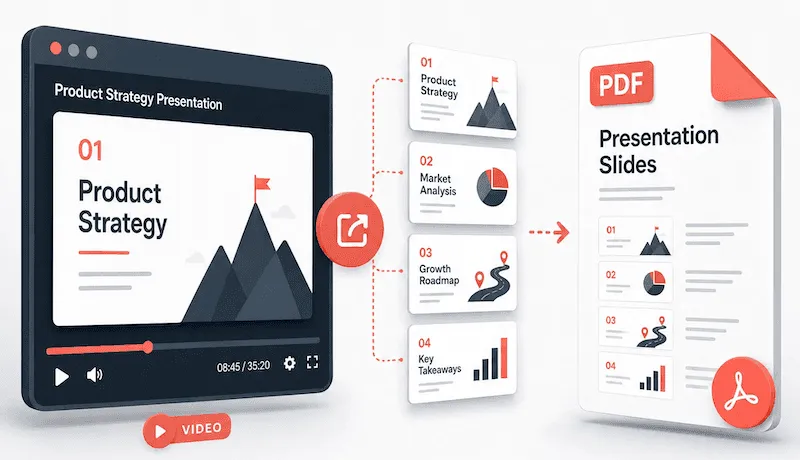
Stop Taking Manual Screenshots of Video Slides
Online video lectures are packed with valuable slides, but pausing every few minutes to take screenshots ruins your study flow.
😫 The Old, Painful Way
Pausing videos constantly to take messy screenshots
Instructor webcam overlays cluttering presentation slides
Hundreds of disorganized image files cluttering your desktop
Typing out spoken dialogue by hand for study notes
✨ The SlideSieve Way
Automatic background capture while you watch lectures uninterrupted
Smart filters remove instructor webcams, code editors & transitions
Clean, ordered multi-page PDF presentation document with one click
Timestamped lecture transcripts synced and exported to TXT, SRT, or VTT
Slide Capture and Transcript Extraction
Extract, review, and export course slides and transcripts — without lifting a finger.
Capture
Slide Detection
An on-device model identifies real slide frames as the video plays — no manual triggers, no configuration.
Transcript Extraction
Pulls the full lesson transcript automatically from all supported platforms (3-lesson trial included free; unlimited with Pro). Read in Timed View (synced to the video) or Readable View (clean reading mode). Export as TXT, SRT, or VTT — or copy to clipboard in one click.
Instructor Frame Filter
Automatically skips frames where the instructor dominates the shot — whether it's a full webcam view, a seated presenter shot, or any frame with no meaningful slide content to capture.
Slide area selector (Slide Detection Zone)
Manually define where SlideSieve looks. Set a capture zone to detect slides only within a specific area of the screen, or set an exclusion zone to ignore a webcam overlay or picture-in-picture window that's interfering with detection.
Remove webcam overlay from slides (PiP Magic Eraser)
When your zone is set to exclude the webcam, SlideSieve removes the selected webcam window and smoothly fills the background area, keeping your exported slides and PDFs clean and distraction-free.
Deduplication
Skips duplicate captures of a static slide, while keeping every step of a bullet build or progressive reveal intact.
Review & Control
Multi-View Slide Browser
Review captured slides in grid, list, or full-screen presentation view. Delete anything you don't want before exporting.
Manual Snap
Capture any frame with one click: code, notebooks, demos, whiteboards, or anything auto-detect skips.
Keyboard Shortcuts
Toggle Auto-Capture with Ctrl + Shift + 8 (Control + Shift + 8 on Mac) or snapshot the active slide instantly with Ctrl + Shift + 9 without touching the mouse.
In-Page Floating Toolbar
A toolbar sits right below the video on supported pages — start capturing without ever leaving the course.
Output & Trust
Local Processing
Every frame is analyzed and processed entirely in your browser. Nothing is uploaded — your video never leaves your device.
PDF & Image Export
Export your slides as a single multi-page PDF or individual images, with the original aspect ratio preserved.
Multi-Platform
Works across DeepLearning.AI, Coursera, Udemy, and YouTube — same toolbar, same workflow, everywhere.
15 Languages
The entire extension UI is fully localised. Language is auto-detected from your browser and can be changed anytime from Settings.
Your Slides Are Saved
Captured slides persist across sessions — pick up where you left off, even after closing the tab or restarting your browser.
How to Save Lecture Slides as a PDF
Extract slides and transcripts in a few simple steps.
Install Extension
Add the SlideSieve Chrome extension to your browser. The tool runs alongside your video player.

Open Video Lecture
Navigate to a supported course platform and open a lecture video. The SlideSieve toolbar appears below the video player.
Set Detection Zone (Optional)
If your course has a persistent instructor webcam (Picture-in-Picture) over the slides, draw a Slide Detection Zone over the slide area to ignore the camera.
Capture Slides
Click Start Auto-Capture, then play the video. The extension analyzes the frames and extracts presentation slides. It captures presentation slides and diagrams, and skips instructor-only shots and transitions. For code walkthroughs, press Manual Snap (Ctrl+Shift+9).
Review Captured Slides
Access your saved slides in the side panel. View them in a grid, list, or presentation view, and delete any unwanted frames.
Export PDF & Transcripts
Generate a PDF document of your slides and optionally export the full course transcript. Read or print your study guide offline.
Simple, Honest Pricing
Start for free. Pick a plan that fits your schedule — own it forever, or grab 3 months for a course sprint.
No credit card required
- DeepLearning.AI, Coursera, Udemy, YouTube, etc.
- Auto slide detection, deduplication & instructor filtering
- Up to 50 slides captured globally
- Slide Detection & Exclude Zones included
- PiP Webcam Magic Eraser
- 3 free transcript extraction trials
- Export free slides to PDF
- Grid, List & Slideshow views
- Multi-language interface (15 languages)
- Unlimited Slide Captures (Pro)
- Unlimited Course Transcripts (Pro)
- Unlimited PDF Exports (Pro)
Expires 90 days after purchase (~$2.33/mo)
- Everything in Free
- Unlimited slides per lesson
- Unlimited PDF Exports
- Slide Detection Zone & PiP Magic Eraser
- Course transcripts (TXT, SRT, VTT)
- Multi-format export (PDF & images)
- Priority support
- Valid for 90 days from purchase
Secure checkout · Instant license key delivery
Launch discount — 32% off. Pay once, use forever.
- Everything in Free
- Unlimited slides per lesson
- Unlimited PDF Exports
- Slide Detection Zone & PiP Magic Eraser
- Course transcripts (TXT, SRT, VTT)
- Multi-format export (PDF & images)
- Priority support
- All future Pro features
Secure checkout · Instant license key delivery
Already have a license key? Open the SlideSieve side panel → Settings → Pro License to activate.
Frequently Asked Questions
Everything you need to know about how SlideSieve captures slides and respects your privacy.
Start Capturing Course Slides in Minutes
Join thousands of students and professionals who study faster with SlideSieve. Free forever, no registration required.
Microsoft EdgeFree starter plan • No credit card needed • 100% private in-browser analysis
Have Questions About SlideSieve?
Ask our AI assistant anything about slide detection, supported platforms, transcripts, or pricing.